Practical, step‑by‑step review to help you decide if KDP Keyword Gold Rush is right for your books.
What KDP Keyword Gold Rush is designed to do
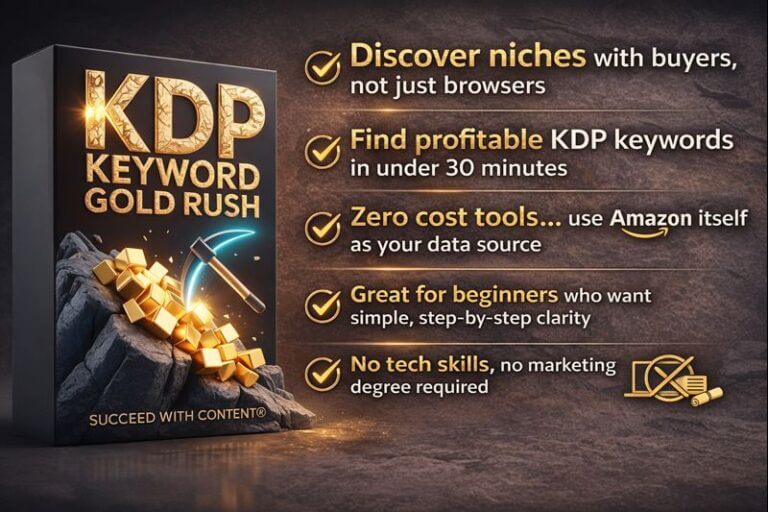
KDP Keyword Gold Rush is a system built to get your book found on Amazon using buyer‑intent keywords. It focuses on the one lever that actually moves the needle in Amazon search: targeted keywords that match what buyers type when they intend to purchase. The program combines a guide, AI tools, video training, cheat sheets, and actionable templates so you can implement a repeatable keyword strategy without paid ads or a big platform.
Core promise
You’ll stop guessing about keyword selection. Instead, you’ll harvest dozens of real buyer keywords quickly, pick the seven backend slots that matter, and apply those keywords across title, subtitle, description and backend fields to unlock Amazon visibility.

Who this is best for
You’ll get the most value if any of the following describe you:
- You’re new to publishing on Amazon and don’t have a large audience or ad budget.
- You have books that aren’t selling and want a fast revival plan.
- You publish fiction, non‑fiction, planners, journals, workbooks, or low‑content products.
- You use AI to help create books and need a system that works with AI‑assisted content.
- You want a repeatable, step‑by‑step method instead of guesswork.
What’s included (and why it matters)
Below is a breakdown of every included item and the value it provides.
| Component | What it is | Why it matters |
|---|---|---|
| KDP Keyword Gold Rush Guide (60 pages) | In‑depth roadmap covering Amazon algorithm basics, 4 reader intents, 30‑minute keyword harvest, Perfect 7 process, pre‑launch, resurrection plans | Offers the theory and stepwise procedures so you know not just what to do, but why each step works |
| KDP Keyword Prospector Custom GPT | AI assistant that generates 50+ high‑intent keywords, selects your best 7, explains choices, suggests optimized titles/subtitles | Accelerates research, removes guesswork, and produces instantly usable suggestions tailored to your book |
| Video Training + Full Transcript | Screen‑recorded walkthrough showing real implementation | Lets you watch the method applied in real time and follow along with the transcript |
| Reader Intent Reference Card | One‑page cheat sheet to judge keyword strength quickly | Helps you vet keywords fast so you don’t waste time on low‑value phrases |
| Title & Subtitle Formula Sheets | Plug‑and‑play formulas for fiction, non‑fiction, low‑content | Makes it easier to craft buyer‑focused titles and subtitles that convert |
| 7‑Day Pre‑Launch Sprint | Daily tasks for a coordinated, low‑stress launch | Helps you avoid last‑minute chaos and builds momentum for launch day |
| 487 Online Niche Markets (bonus) | Curated list of targetable, validated niches | Sparks book ideas and shows underserved audiences you can target |
How the system works — step by step
You’ll be guided through a simple but disciplined workflow designed to find buyer intent, prioritize it, and apply it across your metadata so Amazon can route buyers to your book.
Step 1 — Harvest keywords (30 minutes)
You’ll use the Prospector GPT to produce dozens of real buyer phrases. The emphasis is on queries that indicate purchasing intent (for example, phrases that include “for beginners,” “planner,” “workbook,” or “best book for”). You’ll come away with 50+ candidate keywords without buying expensive tools.
What you do:
- Input your niche and book synopsis into the GPT.
- Ask for 50+ buyer‑intent phrases.
- Quickly scan with the Reader Intent Card to weed out low‑value or irrelevant phrases.
Step 2 — Narrow to the Perfect 7
KDP gives you seven backend keyword slots. You’ll pick the seven that maximize reach, combine high buyer intent with reasonable competition, and ensure relevance to your book’s content.
Selection method:
- Group harvested keywords by intent (transactional, informational, comparative, browsing).
- Prioritize transactional and high‑purchase phrases.
- Choose a mix of short and long phrases to cover broad and niche searches.
Step 3 — Deploy keywords strategically
You don’t just paste the Perfect 7 into the backend. The system shows you where to place them across title, subtitle, product description, and backend slots so all elements reinforce each other.
Best practice:
- Use one high‑value keyword in the title or subtitle if it fits naturally.
- Use a secondary set of keywords in the subtitle and first 150–200 words of the description.
- Place the rest in backend slots, ensuring you respect Amazon’s character limits and repetition rules.
Step 4 — Pre‑launch and launch sprint
If you’re about to publish, the 7‑Day Pre‑Launch Sprint gives you daily tasks that sharpen metadata, collect early reviews, and generate initial traction.
Typical tasks:
- Day 1: Finalize Perfect 7 and title/subtitle.
- Day 3: Upload metadata and check search preview.
- Day 5: Line up early reviewers and schedule promotional activities.
Step 5 — Resurrection for dead books (about 15 minutes per book)
If a title is underperforming, you’ll use the same process to identify mismatched or inadequate keywords, swap in a new Perfect 7, update metadata, and relaunch. The guide and GPT help you know what to change and why.
Fast checklist:
- Replace backend keywords.
- Adjust title/subtitle if needed.
- Refresh description first paragraph.
- Reprice for a short relaunch if appropriate.
What you’ll actually get in your first session
When you run your first 30‑minute harvest with the Prospector GPT, you can expect:
- 50+ buyer‑intent keyword ideas.
- A shortlist of 10–20 strong candidates using the Reader Intent Card.
- A recommended Perfect 7 selected by the GPT with explanations for each choice.
- Suggested title/subtitle options and a short resurrection plan (if you’re updating a live book).
Pros — what you’ll like
- Clarity and focus: You stop wasting time on vanity keywords and target phrases that indicate buyers.
- Speed: You can generate actionable keyword lists in 30 minutes and apply changes in 15 minutes per book.
- Universality: Works for fiction, non‑fiction, and low‑content products.
- AI acceleration: The Custom GPT makes the research portion faster and less intimidating.
- Practical resources: Cheat sheets, formulas, and a 7‑day sprint reduce decision fatigue.
- Cost-effective: No need to buy expensive keyword tools or run paid campaigns.
Cons — limitations and what to watch for
- No guaranteed sales: Even great keywords won’t overcome a poorly written or mismatched product. Keywords improve visibility; conversion still depends on cover, blurb, and content quality.
- Learning curve: You’ll need to learn how to interpret reader intent and volume/competition tradeoffs. The guide helps, but you’ll practice to get good.
- Amazon’s dynamics change: Keywords that work today may shift over time; you’ll need periodic refreshes.
- Backend constraints: Amazon limits characters and rules about repetition — sometimes you can’t fit every ideal phrase.
- Manual testing needed: You’ll still need to test and iterate based on real performance metrics.
How it compares to alternatives
- Versus paid keyword tools: KDP Keyword Gold Rush focuses on buyer intent and offers an AI assistant rather than raw search volumes. Paid tools may show search numbers but don’t tell you which phrases indicate purchase intent.
- Versus ad campaigns: Ads can drive traffic quickly but cost money and don’t solve organic discoverability. This system is designed to improve long‑term organic visibility.
- Versus guesswork or keyword stuffing: This program gives structure and templates, reducing the risk you’ll waste the seven backend slots.
Pricing and perceived value
The product lists component values (Guide $177, GPT $97, Video $79, Reader Card $37). Whether you see the asking price as fair depends on your goals:
- If you publish many titles, the system becomes highly cost‑effective because each book can be optimized in minutes.
- If you publish one book and have a small audience, the ability to revive a dead title or finally get visibility could quickly justify the investment.
Consider value in terms of expected lift:
- Small improvements in discoverability can compound into higher rank, which seeds more sales and better organic placement. For most independent authors, lifting one low‑performing title pays for the program.
Realistic results and timelines
You’ll typically see changes in visibility within days to weeks:
- Immediate: Search result placement can shift as soon as metadata updates propagate (often within 24–48 hours).
- Short term (1–4 weeks): Changes in click‑through and sales rank may appear as Amazon reindexes and shoppers encounter the new metadata.
- Medium term (1–3 months): If keywords were well chosen, you’ll see improved organic placement that sustains sales.
You should track:
- Impressions in KDP reports (if available).
- Click‑through rate from the product page.
- Sales rank fluctuations and absolute sales.
Practical tips for maximum impact
- Use buyer intent, not just search volume: A high‑volume phrase that signals browsing (“books about X”) is less valuable than a moderate‑volume, high‑intent phrase (“best cookbook for beginners”).
- Match your book: Don’t mislead. Keywords must reflect your content or returns and poor reviews will hurt in the long run.
- Rotate tests: Try one metadata change at a time so you can attribute effects. Change the backend first, then test title/subtitle changes if needed.
- Use titles sparingly: Only put a high‑value keyword in the title if it reads naturally and still sells to humans.
- Monitor for seasonality: Some niches move with seasons—plan refreshes accordingly.
- Combine with good cover & blurb: Visibility won’t convert without a compelling cover and first 1–2 lines of your description.
Sample workflows and examples
Below are two short examples showing how you’ll use the system for different book types.
Example A — Non‑fiction how‑to book
- Input niche: “homemade sourdough starter for busy professionals.”
- Prospector GPT returns 60 phrases. Sample hot phrases:
- “sourdough starter for beginners”
- “quick sourdough starter method”
- “easy sourdough starter for busy people”
- “sourdough starter troubleshooting”
- Use Reader Intent Card to pick Perfect 7:
- “sourdough starter for beginners”
- “easy sourdough starter”
- “quick sourdough starter method”
- “sourdough starter troubleshooting”
- “sourdough starter for busy people”
- “starter recipes for sourdough”
- “sourdough starter steps”
- Title/subtitle example (using formula sheet):
- Title: Sourdough Starter Made Simple
- Subtitle: A Quick, No‑Fail Method for Busy Beginners + Troubleshooting Tips
- Deploy backend and update description first paragraph with the main keywords.
- Track metrics and iterate after two weeks if rank doesn’t improve.
Example B — Low‑content planner
- Input niche: “daily gratitude journal for adults.”
- Prospector GPT returns phrases:
- “gratitude journal for adults”
- “daily gratitude journal”
- “guided gratitude journal”
- “daily reflection journal for stress”
- Perfect 7 selected:
- “daily gratitude journal”
- “gratitude journal for adults”
- “guided gratitude journal”
- “daily reflection journal”
- “gratitude prompts for adults”
- “mindfulness gratitude journal”
- “journal for stress relief”
- Title/subtitle:
- Title: Daily Gratitude Journal
- Subtitle: Guided Prompts to Build Calm, Reduce Stress and Track Progress
- Upload backend and use the 7‑Day Pre‑Launch Sprint to solicit early reviews.
Sample Perfect 7 selection matrix
You’ll often choose keywords using a balance of intent, relevance, and competition. Below is a simple selection matrix you can reproduce.
| Keyword | Buyer Intent (1–5) | Relevance (1–5) | Competition (low/med/high) | Priority |
|---|---|---|---|---|
| daily gratitude journal | 5 | 5 | medium | High |
| gratitude journal for adults | 5 | 5 | medium | High |
| guided gratitude journal | 4 | 5 | low | High |
| mindfulness gratitude journal | 4 | 4 | low | Medium |
| journal for stress relief | 4 | 3 | medium | Medium |
| gratitude prompts for adults | 3 | 4 | low | Medium |
| daily reflection journal | 3 | 3 | medium | Low |
Use the Priority column to finalize your Perfect 7.
FAQs you’ll care about
Will this work for fiction?
Yes. Fiction keywords should target reader desires and subgenres. Buyer intent for fiction often shows as “romance with workplace setting,” “cozy mystery small town,” or “sci‑fi space opera series.” The system helps you find those reader‑search phrases and place them where Amazon will use them.
Do you need paid keyword tools?
No. The package is designed to work without expensive third‑party tools. The Prospector GPT emulates keyword research and the Reader Intent Card helps you make judgment calls.
Can the AI do the work for you?
The AI accelerates idea generation and selection, but you’ll still need to vet recommendations and ensure metadata reads well to human buyers.
How often should you refresh keywords?
Refresh when a book is stagnating, when the niche shifts, or seasonally if applicable. A quarterly check is reasonable for most niches.
Common mistakes to avoid
- Overstuffing backend slots with irrelevant but high‑volume phrases.
- Swapping multiple metadata elements at once, which makes it hard to know what worked.
- Prioritizing search volume over buyer intent.
- Ignoring the cover and blurb while focusing solely on keywords.
- Expecting instant bestseller status—keyword work improves visibility, not miracle conversions.
Success indicators to monitor
- Increased impressions and clicks in Amazon’s reporting tools.
- Improved organic conversion rate (visitors to sales) due to better title/subtitle match.
- Better sales rank over a multi‑week period.
- Higher placement in relevant category or search pages.
- More consistent daily sales vs. sporadic spikes.
Verdict — who should buy it
If you want a practical, repeatable system to get discovered on Amazon without throwing money at ads, KDP Keyword Gold Rush is a solid fit. You’ll especially benefit if you publish multiple titles or have books that need a fast, targeted revival. The system won’t replace good cover design and compelling content, but it will make sure Amazon shows your book to customers who are already ready to buy.
Final implementation checklist
- Run the 30‑minute keyword harvest with the Prospector GPT.
- Use the Reader Intent Card to score and sort phrases.
- Pick your Perfect 7 using the selection matrix.
- Update title/subtitle only if it improves clarity and conversion.
- Place remaining keywords in backend slots; use description to reinforce.
- Launch or relaunch using the 7‑Day Pre‑Launch Sprint tasks.
- Track metrics for 2–4 weeks and iterate one change at a time.
Closing tips to make it work for you
- Treat keyword optimization as a skill you practice — the first few attempts will get easier and faster.
- Keep a spreadsheet of tests and outcomes so you learn what works in your niches.
- Combine metadata optimization with occasional price promotions or ad tests for faster feedback.
- Don’t ignore the human buyer: make sure your title, cover, and the first 1–2 lines of your description are persuasive.
If you implement the steps above and use the tools included in KDP Keyword Gold Rush, you’ll convert guesswork into a repeatable process that increases your chances of being found and bought on Amazon.
Here are my VIP Bonuses That No One Gives (If You Grab The Product From Me Today):
Bonus 1: FaceMorph Pro Studio
An advanced face transformation platform that enables seamless face swaps across photos, GIFs, and videos. Create realistic composites or original AI visuals with unlimited edits and clean, watermark-free exports.
Bonus 2: ClipFinder AI Engine
A smart video discovery tool that locates precise moments inside YouTube videos from simple text descriptions. Instantly jump to the most relevant sections without manual searching.
Bonus 3: TextPrecision OCR Suite
High-accuracy AI text extraction that converts images into structured, editable content. Preserves formatting, understands context, and performs reliably even on handwriting and low-quality scans.
Bonus 4: TrendImage Meme Lab
Transform ordinary photos into attention-grabbing, theme-based visuals in seconds. Apply distinctive effects and export optimized graphics ready for social sharing.
Bonus 5: VectorCraft AI Converter
Convert PNG and JPG images into clean, scalable SVG vector files instantly. Ideal for logos, branding assets, illustrations, and web graphics with precise shape and color detection.
Bonus 6: FaceInsight Pro Analyzer
Upload a photo and receive a detailed facial structure assessment. Includes personalized recommendations for hairstyles, eyewear, and styling based on your facial proportions.
Bonus 7: PixelEdit AI Studio
A browser-based editing platform that handles background removal, object cleanup, text replacement, and creative style transformations without complicated software installation.
Bonus 8: NaturalTone Writing Optimizer
Analyze your text for AI-style patterns and refine it into smooth, natural, human-like writing. Improve clarity, credibility, and overall readability instantly.
Bonus 9: VoiceCraft Narration Suite
Create podcasts, audiobooks, and video voiceovers using expressive voice cloning technology. Generate dynamic narration with natural tone variation and multilingual support.
Bonus 10: VideoRefine Pro Editor
Remove logos, watermarks, and unwanted elements from videos using intelligent reconstruction technology. Deliver clean, polished footage with a professional finish.
How To Claim Bonuses: Please send an email to admin@wpprofitent.com and We will send all bonuses within 12 hours.