Full review and breakdown of “Productivity Videos V4” follows.
What “Productivity Videos V4” Is
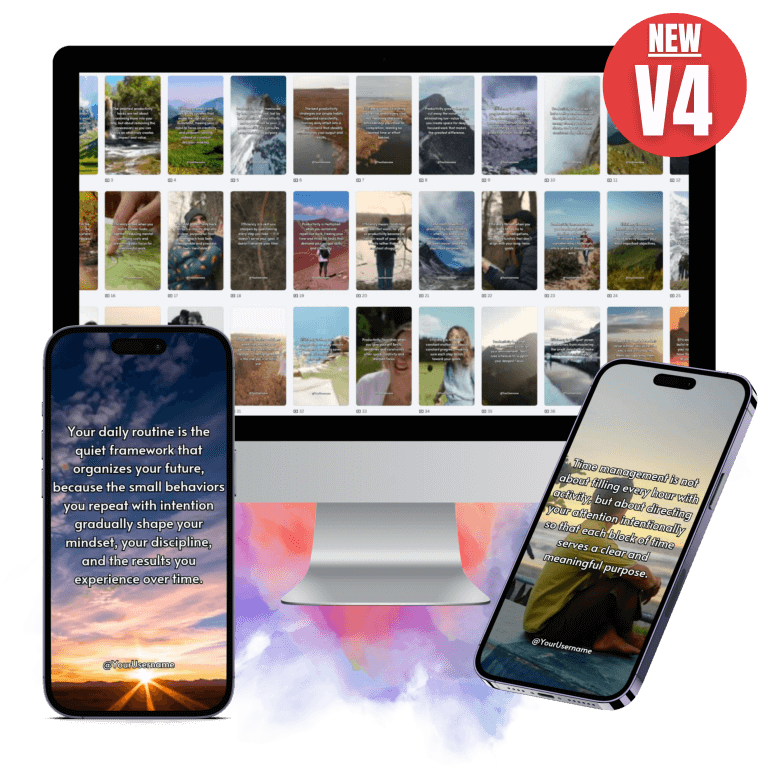
“Productivity Videos V4” is a ready-made content bundle containing 300 short, editable videos designed for TikTok, Instagram Reels, YouTube Shorts and Facebook. Each video focuses on productivity themes like daily routines, habits, time management, focus, and work-life balance. Videos are delivered as Canva-editable templates with unrestricted PLR (Private Label Rights) so you can rebrand, resell, or redistribute them. The bundle also includes editing tutorials and two bonus Master Resell Rights (MRR) packs: “Organize Your Life” and “Go Get It.”
Quick snapshot
Key components
- 300 fully editable short videos (Edition 4)
- Canva templates (editable text, visuals, backgrounds, music)
- Unrestricted PLR rights
- Quick-start Canva editing tutorial
- Bonus MRR bundles: “Organize Your Life” and “Go Get It”
- Support: support@dmelandri.com
- All sales final — no refunds
Target result
You can publish professional short-form productivity videos fast, without filming or advanced editing skills, with the goal of growing social channels via high-engagement formats.

Who this is best for
- Content creators who want to grow short-form channels quickly without producing original footage.
- Busy entrepreneurs and coaches who need consistent social content but lack time to create it.
- Agencies and freelancers looking to resell content or offer ready-made social packages to clients.
- New accounts that need a consistent posting schedule to trigger algorithmic growth.
- Marketers who want to test productivity niches without upfront creative investment.
Who might not benefit as much
- Creators who require totally unique footage and personal branding that must include your face or voice.
- Brands restricted by strict brand compliance or legal constraints requiring bespoke contracts for licensed music/footage (you’ll need to confirm licensing match your use).
- People expecting refunds — all sales are final.
What’s included — detailed breakdown
Core pack (300 videos)
- 300 short videos focused on productivity topics
- No overlap with previous editions (made to be unique compared to prior bundles)
- Formats optimized for TikTok/Reels/Shorts (vertical, short duration, high engagement)
Editing and customization
- Editable in Canva (text, music, visuals, backgrounds)
- Quick-start tutorial showing editing and customization approaches to maximize platform engagement
- Recommendations to make small edits before uploading to avoid duplicate-content penalties
Commercial rights and bonuses
- Unrestricted PLR: you can rebrand, resell, or distribute however you want
- BONUS 1: “Organize Your Life” bundle (ebook, video course, sales materials, graphics, articles) — MRR
- BONUS 2: “Go Get It” bundle (ebook, video course, sales materials, graphics, articles) — MRR
Feature table
| Feature | What it means for you | Value / Notes |
|---|---|---|
| 300 Videos | Large volume of ready-to-publish content | Upload 1–2/day for months |
| Canva editable | Simple, browser-based edits | No complex video editor required |
| PLR rights | Full commercial use and rebranding | Sell as-is or repurpose |
| Tutorial | Step-by-step Canva editing tips | Helps avoid duplicate-content issues |
| Bonus bundles (MRR) | Extra products to resell or bundle | Adds revenue opportunities |
| Platform optimization | Short, vertical format | Tailored for TikTok/Reels/Shorts algorithms |
| Refund policy | All sales final | Plan purchase accordingly |
| Support | Email support provided | support@dmelandri.com |
First impressions and quality assessment
You’ll notice this product is built for speed and scale. The videos are pre-formatted in the vertical aspect ratio and use short, snappy messages that align with typical viral hooks on short-form platforms. The Canva templates are a major usability plus — you can change wording, colors, and imagery in minutes.
From a design standpoint, expect a mix of text-on-screen, quick cut clips, and integrated graphics. Visual quality is generally optimized for mobile viewing rather than cinematic detail, which matches the intended platform usage. Audio elements and music are included, but for maximum account safety and uniqueness you’ll likely swap music or add voiceovers.
Practical usability — how you’ll use it
Step-by-step workflow
- Open a video template in Canva (link or file provided with purchase).
- Edit on-screen text to reflect your voice, add your handle and branding.
- Optionally change background imagery, swap music or add a voiceover.
- Export the video at recommended vertical settings.
- Upload to TikTok/Instagram Reels/YouTube Shorts with a platform-optimized caption and hashtags.
- Monitor performance and iterate — small variations often change engagement.
Editing time estimate
- Quick tweak: 2–5 minutes (change text, brand color)
- Moderate customization: 10–20 minutes (swap visuals, music, add voiceover)
- Full rebrand/resell setup: 30–60+ minutes per set (packaging with bonus materials)
Tips to make the videos perform better
- Make small edits before uploading: change wording, font sizes, clip order, or visual overlays to avoid duplicate-content penalties.
- Add a brief personal intro/outro (3–6 seconds) with your face or logo to boost authenticity.
- Replace the music with trending sounds on the platform to increase reach.
- Use platform-native features (text stickers, polls, captions) during upload to increase watch time.
- Write captions that encourage a quick action (save/share/comment) and include relevant hashtags and keywords.
- Test posting times and formats — try 1 video/day for the first week, then scale to 2/day and compare growth.
Monetization and repurposing strategies
Because you get PLR and bonus MRR packs, you can:
- Rebrand and sell the videos as a social media package to clients.
- Bundle the videos with coaching or consulting services.
- Use the bonus MRR bundles as lead magnets or upsells.
- Split videos into micro-content: single clips, story snippets, or ads.
- Create paid courses or membership content using the included ebooks and course materials.
Pricing and value analysis
The product lists a perceived itemized value:
- 300 editable videos — Value: $147
- Canva editing tutorial — Value: $17
- “Organize Your Life” bundle (MRR) — Value: $97
- “Go Get It” bundle (MRR) — Value: $97
Whether the price is a good deal depends on your intended use:
- If you plan to publish consistently and scale a short-form channel, the time savings alone can justify the cost.
- For agencies or resellers, PLR and MRR rights can create direct revenue streams that offset purchase price quickly.
- If you only want a few unique clips or prefer filming personally, this mass bundle might be more than you need.
Pros and cons
Pros
- Huge volume: 300 videos provides sustained posting capacity.
- Time-saver: minimal production or editing skills required.
- Canva-based editing: very accessible for non-editors.
- PLR and MRR rights: flexible monetization and rebranding.
- Optimized for short-form platforms: ready-made vertical content.
- Bonus packs add resale and value options.
Cons
- Potential duplicate-content risk: you need to edit to improve uniqueness.
- All sales final: no refunds if it’s not what you expected.
- Visual and audio elements may require swapping for brand consistency.
- If you prefer filmed, personalized content, this is less suited.
- Might require additional work to fully align with strict brand or legal guidelines.
How to customize for your brand (practical checklist)
- Replace all placeholder handles and CTAs with your brand name and links.
- Change fonts and colors to match your brand kit.
- Add a 2–4 second branded intro or watermark.
- Swap music for platform-safe or trending audio.
- Add captions or closed captions for accessibility and retention.
- Translate on-screen text into your target language (Canva makes this simple).
- Insert short voiceovers to add personal authenticity.
- Reorder or split clips to fine-tune pacing.
Content strategy suggestions
- Use a content calendar: schedule 1 video/day for the first 30 days to build momentum.
- Mix video types: tips list, daily routine, mini-challenges, before/after, productivity myths.
- Pair videos with a daily prompt in the caption to encourage comments and saves.
- Use A/B testing: upload two versions of the same video at different times or with different hooks to see which performs better.
- Repurpose top performers into ads or longer YouTube content.
Sample captions and hooks (ready-to-use)
- “3 tiny habits that doubled my focus — try #2 today.”
- “Struggling with afternoon slumps? This 5-minute fix helps.”
- “If you only do one thing for productivity, make it this.”
- “Stop wasting your mornings — here’s a simple routine you can use.”
- “Work smarter: 4 tools that saved me 2 hours a day.”
Performance expectations and metrics to track
- Watch time and average view duration — short videos rely on retention.
- Completion rate — higher completion often signals quality to algorithms.
- Engagement: likes, comments, shares, and saves — these drive distribution.
- Follower growth rate — shows long-term impact of consistent posting.
- Click-throughs and conversions — track bio link or landing page traffic if using videos to sell.
Legal and copyright considerations
- Verify that the provided media (audio, images, clips) are cleared for use under the PLR/license terms included with purchase.
- Replace or change music if you’re concerned about copyright claims or want to use trending platform-native audio.
- For commercial reselling, ensure you follow platform rules when repackaging or selling content to clients.
- All sales final — confirm you accept their refund policy before purchase.
Comparison to other options
- Creating videos yourself: higher authenticity, unique footage, more time-consuming and usually more expensive if hiring editors.
- Hiring an editor or agency: bespoke quality, but recurring cost and slower turnaround.
- Buying single-theme packs: cheaper upfront but less volume and fewer resale opportunities.
- “Productivity Videos V4” advantage: high volume, fast publishing, PLR flexibility, and built-in tutorial for non-editors.
Realistic use-case scenarios
- You’re a life coach who wants daily short videos on habit-building without filming every day — you can brand the templates and upload consistently.
- You run a marketing agency that offers monthly content packages — rebrand and resell these videos to multiple clients.
- You’re testing the productivity niche and need to validate topics quickly — publish a variety of clips to see which subtopics perform best.
- You manage a personal brand and want to scale presence while outsourcing creative time — use the videos as a base and add personalized intros.
Common pitfalls and how to avoid them
- Uploading without edits: You’ll risk duplicate-content penalties and lower engagement. Fix: Make small changes each upload.
- Using non-trending music: The algorithm often favors trending sounds. Fix: swap music to trending audio or add a voiceover and captions.
- Ignoring captions and hashtags: Titles and descriptions drive discoverability. Fix: invest time in thoughtful captions and hashtag sets.
- Over-branding early: Too many logos or long intros can reduce watch-time. Fix: Keep intros short and integrate branding subtly.
Bonus packs: how to use them
- “Organize Your Life” (MRR) — use as lead magnets, giveaway content, or upsell materials in a productivity course.
- “Go Get It” (MRR) — use to create a paid product bundle for local clients, or include the ebooks as downloadable bonuses with a membership.
Checklist for first 7 days after purchase
Day 1:
- Download files and open the Canva tutorial.
- Edit and publish 1 video with minimal branding.
Day 2:
- Publish a second video; test a different hook or caption style.
- Replace music with a trending sound.
Day 3:
- Add a 3-second personal intro to one video.
- Track watch time and engagement for the first two videos.
Day 4:
- Publish a third video from a different subtopic (habits vs time management).
- Start modest A/B experiment: two versions of the same hook.
Day 5:
- Review analytics and double down on the best-performing style.
- Prepare 7 more templates to edit in batch.
Day 6:
- Use one bonus MRR ebook as a downloadable lead magnet in your bio link.
- Promote a top video in a story or with a small ad to test paid reach.
Day 7:
- Plan the next 14-day content calendar and set a posting schedule.
Frequently asked questions (expanded)
Are the videos really editable?
Yes — everything (including text) can be edited in Canva. That includes backgrounds, music, visuals and on-screen text. If you need help, the bundle includes a quick-start tutorial.
Will I get copyright strikes?
The videos are provided for safe upload, but best practice is to make small edits before uploading to reduce duplicate-content flags. If you swap music or use platform-native audio, you minimize music-related risks.
Can I resell or rebrand these videos?
Yes. The bundle comes with unrestricted PLR rights for the videos and MRR for the two bonus packs, so you can rebrand, resell, or redistribute.
How many videos should I post daily?
Start with 1 per day for new accounts to gather data. If you have bandwidth, move to 2 per day to accelerate growth.
Is there a refund?
All sales are final — no refunds.
Final verdict and recommendation
If your goal is to rapidly populate a short-video channel with consistent, professional-looking content, “Productivity Videos V4” gives you a large inventory and the flexibility to brand and resell content. You’ll save time and get templates that are already tuned for short-form platforms. The real value comes if you actually edit each video slightly to match your voice and platform trends — that’s what turns templates into viral potential.
If you’re looking for absolute uniqueness or a fully personalized content pipeline based on filmed footage and personal storytelling, this will be less helpful on its own. But even then, you can combine these templates with your filmed clips to create hybrid content that scales.
Actionable next steps
- Buy the pack only after confirming the no-refund policy is acceptable to you.
- Open the Canva tutorial immediately and edit one video to get comfortable with the workflow.
- Set a 30-day posting schedule: 1/day for two weeks, then increase if performance warrants.
- Use the bonus MRR packs for lead generation and upselling opportunities.
- Track key metrics (watch time, completion rate, engagement, follower growth) and optimize based on top performers.
Support and contact
If you need help with the product or have questions about file access, contact support at support@dmelandri.com.
If you want, I can now:
- Help you draft 30 captions and hooks tailored to your niche and voice.
- Create a 30-day posting calendar using the 300 videos so you can publish without planning overhead.
- Outline a simple A/B test matrix to identify top-performing hooks.
Tell me which of those you’d like to get started with.
Here are my VIP Bonuses That No One Gives (If You Grab The Product From Me Today):
Bonus 1: FusionEdit AI Studio
A complete AI-powered editing workspace for both photos and videos. Enhance visuals, retouch images, generate creative assets, and perform seamless face transformations within one streamlined platform.
Bonus 2: AudioForge Sound Studio
Create and refine custom soundtracks for your videos using an intelligent audio engine. Adjust sound layers, maintain mood consistency, and synchronize audio perfectly with your visuals.
Bonus 3: DocMind PDF Assistant
An interactive document assistant that extracts text from PDFs, answers questions, and explains complex sections clearly. Quickly understand long documents through built-in chat and structured summaries.
Bonus 4: RapidInsight AI Summarizer
Condense lengthy articles, reports, or documents into clear key points within seconds. Paste text or upload files and explore deeper insights using the integrated chat interface.
Bonus 5: CreatorSuite AI Platform
A powerful collection of AI creative tools that helps you generate content, images, blog ideas, quizzes, logos, YouTube descriptions, and more from a single centralized dashboard.
Bonus 6: HarmonyTrack AI Composer
Generate fully arranged music tracks from simple prompts or lyrics. Select your preferred genre and musical style to create professional compositions ready for use.
Bonus 7: UltimateFile Utility Suite
An all-in-one digital toolkit with more than 20 utilities to convert, compress, edit, and manage PDFs, images, videos, and other files quickly and efficiently.
Bonus 8: NaturalWrite Text Refiner
Transform AI-generated text into natural, human-like writing. Improve tone, clarity, and readability for professional communication, SEO content, or academic writing.
Bonus 9: VisualVault Image Library
Access a large database of AI-generated images categorized by theme and style. Easily search and download high-quality visuals for your creative projects.
Bonus 10: VisionForge Image Creator
Turn simple ideas into detailed visual artwork using an intuitive AI image generator. Ideal for character design, digital assets, product mockups, and creative illustrations.
Bonus 11: SiteLaunch AI Builder
Generate complete websites and web applications from a single prompt. Includes responsive layouts, live previews, and built-in SEO optimization for fast deployment.
Bonus 12: OpenCore AI Workspace
A flexible AI environment that supports image generation, coding assistance, and web-based research using powerful open-source AI models.
How To Claim Bonuses: Please send an email to admin@wpprofitent.com and We will send all bonuses within 12 hours.
ABOUT HARRYHONESTREVIEW WEBSITE