
Product reviewed: AI UGC Profit System with PLR
Product overview
The AI UGC Profit System with PLR is a ready-to-sell course package that lets you launch an AI-powered UGC (user-generated content) content business quickly. It’s a private label rights (PLR) bundle, meaning you can rebrand the materials, keep 100% of the sales, and sell this training as your own. The package focuses on creating faceless short-form videos, writing high-converting AI UGC scripts and prompts, automating production, and monetizing UGC without the usual gear or production skills.
Core promise
You’ll be able to:
- Produce authentic-looking UGC short-form videos using AI tools.
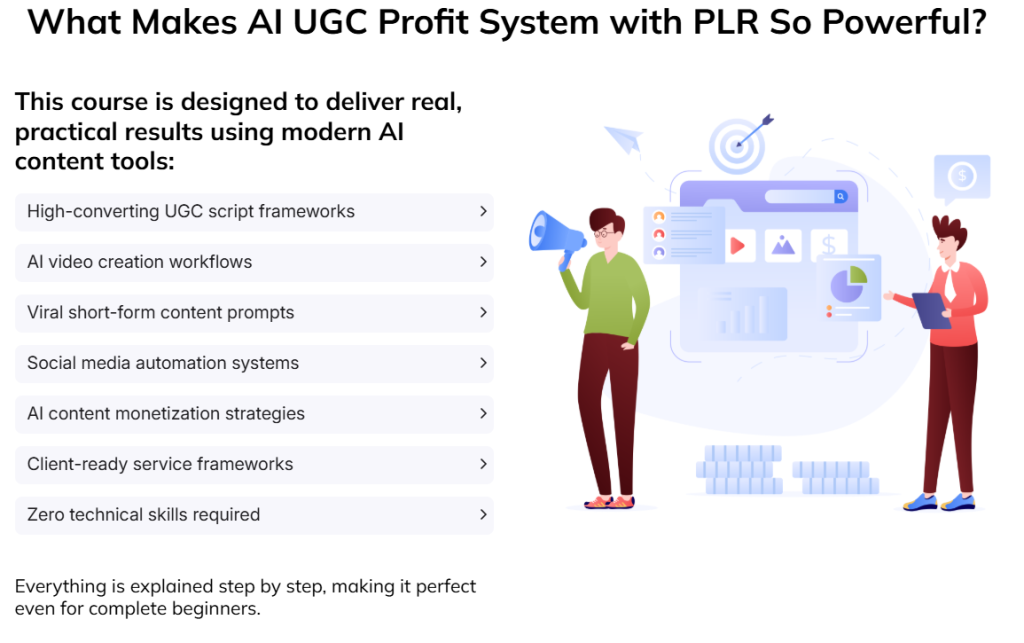
- Generate high-converting UGC scripts and AI prompts.
- Automate content production to scale output and create viral systems.
- Offer AI UGC services or sell the rebranded course as a digital product.
- Use PLR rights to rebrand and immediately monetize the materials.

What’s included (detailed)
The bundle is comprehensive and meant to be sales-ready. Below is a condensed inventory and the intended purpose of each item.
| Item | Format | Purpose / How you’ll use it |
|---|---|---|
| 5-Part HD Training Video Series | HD video files | Core step-by-step training for your customers; can be sold as the main product or used in membership content |
| 149-page Training Guide (~18,991 words) | PDF / DOCX | Complete written course material for learners who prefer text or for repurposing into blog posts, lead magnets, or transcripts |
| 5 Audio Files | MP3 | For customers who prefer audio; useful as podcast episodes or upsell extras |
| 5 Raw Video Script Files | TXT / DOCX | Editable scripts for voiceovers, sales videos, or to feed into AI tools for video production |
| 5 Presentation Slide Decks | PPT | Ready-to-present materials for webinars or live training sessions |
| High-Converting Sales Copy + Customer Sales Video (Doodle) | DOCX + video | Ready-to-use sales page text, email sequences, and a doodle-style sales video to add to your funnel |
| Professional Graphics (PSD/PNG), Animated Banners | PSD, PNG, GIF | Visual assets for the sales page, ads, and social promotion |
| PDF Graphics, Chapter Images | PDF/PNG | Supplementary visuals for the training guide and marketing |
| Minisite Templates + Legal Pages | HTML/PHP templates + legal docs | Quick site launch templates including privacy policy and terms |
| Email Swipe Library | TXT/DOCX | Pre-written emails for launches, follow-ups, and funnels |
| Cheat Sheet, Mind Map, Top Resources Report | Quick-reference materials and bonus content to increase perceived value |
In-depth content breakdown
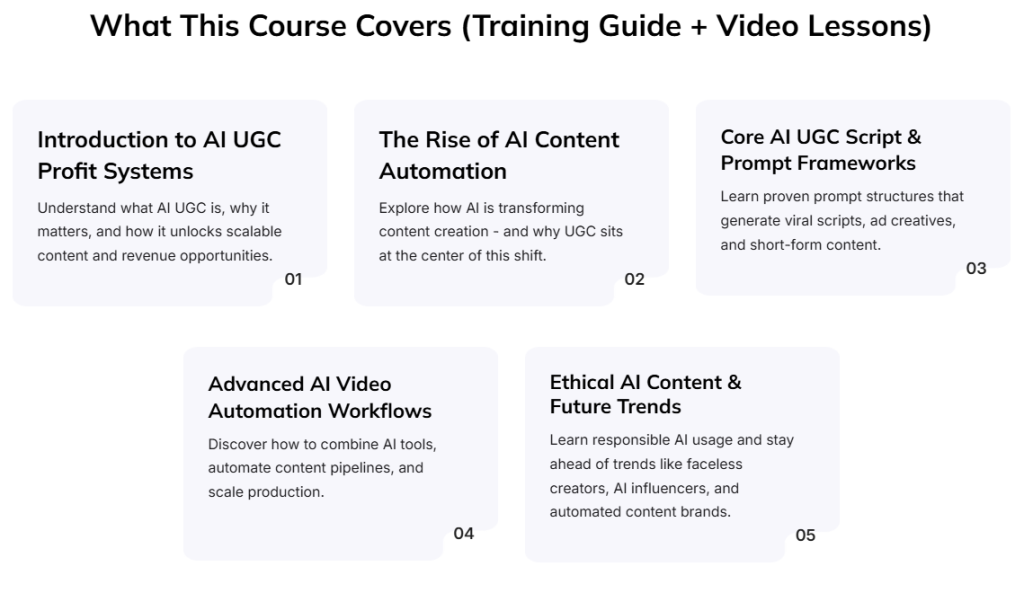
5-Part HD Training Video Series
- Focus: Step-by-step walkthrough on building an AI-driven UGC production workflow.
- Strengths: Visual demonstrations, workflows, and tool walkthroughs reduce learning friction.
- How you’ll use it: Host the videos on your own membership site, embed inside a course platform, or use them as a gated product to collect leads.
149-Page Training Guide
- Focus: Long-form written training that mirrors the video content.
- Strengths: Detailed explanations, screenshots, and step sequences. Good for SEO if you repurpose sections into blog posts.
- How you’ll use it: Deliver as the course textbook, split into modules for email drip campaigns, or provide as a downloadable bonus.
Scripts, Audio, Slides
- Scripts let you quickly generate voiceovers or feed into AI video tools.
- Audio files offer alternative consumption modes and increase perceived product value.
- Slides enable you to host live webinars or create additional video content.
Marketing and Funnel Assets
- Sales copy and doodle-style sales video: Allows you to quickly spin up a conversion-optimized sales page.
- Minisite templates and legal pages: Removes friction for launching; you only need to rebrand and upload.
- Email swipes, cheat sheets, and bonuses: Designed to increase conversions and provide upsell/cross-sell opportunities.
Who this is best for
- You want to start selling training or services in AI-powered UGC but lack content creation experience.
- You’re an agency owner or freelancer who wants to offer AI UGC services quickly.
- You run funnels and want a high-value lead magnet or front-end product for list growth.
- You prefer a rebrand-and-sell product to save creation time.
- You’re comfortable customizing PLR content and handling basic website setup.
Usability and setup
This package is designed for quick deployment:
- Download the files, customize branding (logos, color, domain), upload to your platform, and start selling.
- Technical skill level: basic-to-intermediate. If you can edit a Word doc, use PowerPoint, and upload files to a web host or course platform, you can get started.
- No filming or editing experience required to deliver AI-generated, faceless videos—most of the content shows you how to use AI tools to generate scripts, voiceovers, and video assets.
Quality assessment
Overall content quality appears to be professional and serviceable for both beginners and mid-level practitioners. Key quality observations:
- Training depth: The 149-page guide and multi-part videos suggest comprehensive coverage from concept to monetization.
- Production value: Asset lists include PSD files, animated banners, and HD videos—these indicate a polished presentation.
- Practicality: Scripts, mini-site templates, and legal pages accelerate implementation, which is critical for buyers who want fast results.
- Limitations: PLR quality can vary in originality. You should audit content for current tool mentions, pricing updates, and examples that may become outdated as AI tools evolve.
Ethical and legal considerations
- PLR usage: You’re allowed to rebrand and sell, but confirm the exact PLR license terms (resale rights, modification rights, restrictions on giving PLR away, etc.). The product states rebrand and keep 100% of sales, but you should read included license files to confirm any restrictions.
- AI ethics: The course includes a module on ethical AI practices and future trends. You should apply those best practices personally and to any clients you serve—particularly around disclosure, consent for likenesses, and copyright for sourced media.
- Compliance: Use the provided privacy policy and terms as a starting point, but tailor them for your jurisdiction and business model.
Monetization strategies you can use
You can profit from this package in multiple ways. Below are practical strategies and rough pricing suggestions.
Sell as a course or membership
- One-time course price: $47–$297 depending on your positioning and included bonuses.
- Membership: $15–$97/month with recurring content or support.
- Upsell coaching or done-for-you services at a premium.
Offer AI UGC services
- Package service pricing: $300–$2,000+ per month depending on video volume, customization, and results.
- White-label services for other agencies with higher markups.
Funnels and lead magnets
- Use parts of the guide, the cheat sheet, or a webinar to collect leads and then upsell the full course or services.
- Bundle with other PLR products to increase perceived value and price.
Licensing and agency models
- Sell agency packages where you produce AI UGC for multiple clients.
- Offer training plus done-for-you launch services, charging setup fees.
Pricing the product and profit math (example scenarios)
- Low-ticket course: Price $47; sell 100 copies = $4,700.
- Mid-tier launch: Price $197; sell 100 copies = $19,700.
- Service-based: Offer monthly retainer $1,000 to 5 clients = $5,000/month.
If you add targeted ads, funnel optimization, and an email sequence, conversion rates and profit per lead improve significantly. The included sales copy and video accelerate testing.
Implementation roadmap (30-day launch plan)
This practical roadmap shows how you can move from purchase to first sale in 30 days.
Week 1: Customize and brand
- Download package, review license, and pick your domain and product name (you may keep the original name or rename).
- Replace logos, update colors, and personalize the training guide and slides with your voice and examples.
- Set up hosting and install minisite template.
Week 2: Build funnel and assets
- Edit the provided sales copy and integrate the doodle sales video on the sales page.
- Set up email swipes for a welcome, cart abandonment, and a 3-day launch sequence.
- Create a small ad creative set using provided graphics.
Week 3: Launch to warm audience
- Open pre-sales to your email list or social audience with a special price.
- Run a small paid traffic test (Facebook, TikTok, or Google) to validate messaging.
- Host a live Q&A or webinar using the slide deck.
Week 4: Optimize and scale
- Review metrics: conversion rate, cost per acquisition, and ROI.
- Tweak sales copy, test price points, and add testimonials or case studies.
- Offer upsells: coaching, DFY setup, or additional bundles.
Pros and cons
Pros
- Extremely fast to launch: everything is sales-ready.
- Wide range of assets: videos, guides, slides, graphics, and legal pages.
- PLR rights let you keep 100% of sales with rebranding.
- Targets a high-demand niche: UGC + AI.
- Multiple monetization paths: course, membership, services, funnels.
Cons
- PLR saturation risk: similar packages may be available to others; you’ll need to customize to stand out.
- Rapid AI tool changes: some tool references may become outdated and require updates.
- Moderate technical setup required if you want a professional sales funnel.
- Need to verify and possibly update legal templates to match local laws.
Comparison to alternatives
Compared to building course content from scratch:
- Time savings: Huge. You avoid creating videos, slides, and sales copy.
- Originality: Lower—PLR products are reusable by others. You’ll need to customize.
- Cost: Far lower than hiring freelancers and course creators.
Compared to freelance-driven service launch:
- Scalability: With AI automation, you can scale faster without hiring lots of talent.
- Brand trust: You’ll need to provide real results to win and keep clients.
How to differentiate your offer
Because PLR is transferable, differentiation is critical:
- Add case studies from your own experiments using the system.
- Update tools, pricing, and workflows to the latest AI solutions.
- Create exclusive bonuses: 1-on-1 coaching calls, private community access, additional templates.
- Offer performance guarantees or trial projects for service clients.
- Localize the content for specific niches (beauty, SaaS, e-commerce) and target niche-specific ads.
Marketing message examples you can use
- Lead magnet offer idea: “Free AI UGC Cheat Sheet: Generate 10 Ready-to-Use UGC Scripts in 10 Minutes”
- Webinar topic idea: “How to Create Faceless UGC Videos That Convert — Fast, Cheap, and Scalable”
- Email launch angle: Focus on speed to market, low barrier to entry, and real-world client results.
Support, updates, and longevity
- Included assets suggest the product is built for immediate sale rather than long-term updates. Check whether the vendor offers updates for changes in AI tooling.
- If you plan to use it as a long-term product, commit to reviewing the guide and videos every 3–6 months to refresh tool mentions and screenshots.
- Build a support FAQ and standard operating procedures (SOPs) for any DFY services you plan to offer.
Final recommendation and scoring
If your goal is to launch a market-facing product or service quickly, the AI UGC Profit System with PLR is a high-value starting point. It’s especially useful when you want to:
- Avoid creating course content from scratch.
- Offer a turnkey service or training product.
- Use PLR materials to test niches or funnel concepts rapidly.
Scoring (out of 10)
- Time-to-launch: 9/10
- Completeness of assets: 9/10
- Ease of customization: 8/10
- Long-term sustainability: 7/10
- Originality / differentiation: 6/10
Overall: 7.8/10 — solid package that requires your personalization and ongoing updates for long-term success.
Practical tips to maximize profit
- Personalize examples: Replace generic case studies with your own experiments and results to build credibility.
- Bundle: Combine this product with niche-specific PLR or complementary courses to increase price points.
- Upsell services: Offer setup or done-for-you video creation as a high-ticket upsell to purchasers who want immediate results.
- Collect testimonials fast: Run a beta cohort or limited free trial to gather initial social proof.
- Use the audio and slides to create short, repurposed content on social platforms to drive organic traffic.
Quick checklist before you launch
- Verify PLR license details and any resale restrictions.
- Update AI tool names, screenshots, and pricing to current info.
- Rebrand all templates (logo, colors, contact info).
- Customize sales copy to match your voice and niche.
- Install analytics and conversion tracking on your minisite.
- Prepare customer support templates and refund policy.
FAQ
Can you sell the product as-is without changes?
Yes, but for best results you should personalize branding, update references to current AI tools, and add at least one unique bonus or case study. This reduces churn and increases perceived value.
Is the PLR license exclusive?
No. PLR is typically non-exclusive. Confirm specifics in the license files included with your purchase. Expect other sellers may use the same base content.
Do you need video editing skills?
No. The course teaches faceless short-form production using AI tools that minimize or eliminate the need for traditional filming and editing skills.
Is the price of $9.95 a good deal?
Yes, for the assets provided it’s an inexpensive entry price. Your profit potential comes from rebranding, repackaging, and reselling at your chosen price point. The key is customization and marketing investment.
Closing notes
You’re getting a turnkey PLR product aimed at a high-converting format (UGC) combined with AI-driven workflows. If you commit to customizing the content, staying current with AI tools, and adding strong marketing and support, you can convert this one-off purchase into a reliable revenue stream—whether as a product, membership, or service business. The package removes the heavy lifting of content creation so you can focus on positioning, lead generation, and delivering results to clients and students.

VIP BONUS PACKAGE EVER
Purchase any product from my review site and join our IM Club, filled with monthly content that teaches you how to monetize using AI tools.
We have been running this club for 2 years, and it already includes 70+ high-quality IM training sessions with amazing feedback from members.
All you need to do is purchase the product through our link, and you’ll get lifetime access to our IM Club without paying any extra fees.





Here are my VIP Bonuses That No One Gives (If You Grab The Product From Me Today):
Bonus 1: FaceAlter AI Studio
A smart visual editing tool that lets you replace or modify faces in photos, GIFs, and videos. Produce convincing visual transformations and creative digital compositions in minutes.
Bonus 2: ClipSearch Navigator
An intelligent video search assistant that identifies exact segments inside YouTube videos from simple keyword descriptions.
Bonus 3: ImageScript Extractor
Capture readable text from screenshots, photos, or scanned documents while maintaining layout and structure.
Bonus 4: MemeDesign Factory
Turn ordinary images into attention-grabbing meme graphics using customizable templates and social-ready design effects.
Bonus 5: VectorImage Builder
Convert bitmap images into scalable vector graphics ideal for logos, icons, and professional design assets.
Bonus 6: PortraitInsight Analyzer
Upload a photo and receive an AI-generated analysis of facial proportions along with appearance suggestions.
Bonus 7: PhotoRefine Editing Tool
A lightweight browser-based editor that allows you to retouch images, remove backgrounds, and adjust colors easily.
Bonus 8: WriteHuman Content Refiner
Improve AI-generated text by adjusting tone and sentence structure to make the writing sound more natural.
Bonus 9: VoiceNarrator Pro
Create voiceovers for videos, podcasts, or presentations with expressive AI speech and multilingual capabilities.
Bonus 10: VideoFix Cleaner
Remove unwanted elements such as logos and watermarks from video footage while restoring the surrounding frames.
Bonus 11: BackgroundSwitch Video Tool
Replace video backgrounds instantly without needing a green screen, allowing creative scene changes.
Bonus 12: ImageSharp Enhancer
Increase image resolution and detail with AI-powered sharpening while preserving natural color balance.
Bonus 13: LaunchPage Creator
Generate responsive landing pages designed for marketing campaigns and lead capture.
Bonus 14: FunnelDesign Page Builder
Build professional marketing pages with automated layouts and mobile optimization.
Bonus 15: ComicCharacter Studio
Create illustrated characters and comic panels with adjustable poses, expressions, and visual styles.
Bonus 16: MultiVoice Translation Studio
Translate and dub video content into multiple languages using natural voice synthesis.
Bonus 17: PictureTranslate Reader
Detect and translate text embedded in photos, screenshots, and images instantly.
Bonus 18: GrammarMaster Editor
Correct grammar and punctuation automatically to produce more professional written content.
Bonus 19: RewriteCraft Engine
Rewrite text to improve readability, tone, and flow without changing the core message.
Bonus 20: VideoCompress Manager
Reduce the size of video files while maintaining clear playback quality.
Bonus 21: ColorArt Page Maker
Generate printable coloring pages from prompts or images for creative or educational use.
Bonus 22: FaceInsert AI Tool
Insert faces into photos or videos with smooth blending and natural lighting effects.
Bonus 23: SpeechSync Visual Engine
Align audio narration with facial movement to create realistic talking visuals.
Bonus 24: FontCreator Workshop
Generate custom typography styles including digital signatures and decorative lettering.
Bonus 25: BackgroundCut Image Tool
Remove backgrounds from photos quickly and export transparent images for design work.
Bonus 26: VoiceRead Browser Tool
Convert written text into spoken audio directly from your browser without extra software.
Bonus 27: MediaEdit Creator Suite
Enhance images and videos with editing tools that adjust color, lighting, and visual effects.
Bonus 28: MusicBuilder AI Studio
Produce background music tracks by choosing genre, tempo, and mood.
Bonus 29: PDFSmart Analyzer
Extract important insights from PDF documents and generate structured summaries.
Bonus 30: DocumentSummary Generator
Convert long articles and reports into concise summaries highlighting the main ideas.
Bonus 31: CreativeIdea Toolkit
Generate blog ideas, graphics, and marketing content from one AI-powered dashboard.
Bonus 32: MelodyComposer Engine
Create original songs from prompts or lyrics with adjustable music style and arrangement.
Bonus 33: FileUtility Manager
A toolkit containing multiple utilities for converting, compressing, and managing digital files.
Bonus 34: ContentPolish Editor
Improve AI-generated text by refining grammar, tone, and readability.
Bonus 35: VisualAsset Library
Access a large collection of AI-generated images categorized for marketing and creative use.
Bonus 36: PromptImage Creator
Generate unique visuals from text prompts including concept art and product images.
Bonus 37: WebsiteBuilder Launch Tool
Create complete websites from a simple prompt with responsive design and SEO-ready structure.
Bonus 38: AI Creator Workspace
An integrated environment that combines AI content generation, coding assistance, and research tools in one platform.
How To Claim Bonuses: Please send an email to [email protected] and We will send all bonuses within 12 hours.