

Are you ready to turn your aging blog content into high-performing pages that attract more traffic and conversions using AI?
Using AI to Refresh Old Blog Posts for Better SEO: A Practical Guide
This guide shows you how to use AI to update and improve your old blog posts so they rank better, serve your audience, and save you time. You’ll get practical steps, prompt templates, tools, and checklists you can apply immediately.

Why refresh old posts?
Refreshing old posts helps you capture lost opportunity and leverage existing authority on your site. You’ll target keywords that have shifted, fix outdated information, and increase user satisfaction — all of which can boost search visibility.
When should you use AI to update content?
AI is most helpful when you need speed, scale, and creative alternatives for headlines, outlines, or metadata. You should still pair AI with human review to ensure accuracy, tone, and brand alignment.
Benefits of using AI to update posts
AI offers fast ideation, consistent output, and the ability to rewrite or expand content at scale. It can generate titles, meta descriptions, outlines, and drafts that you refine to match your expertise and voice.
Preparing: content audit and selection
Before you start updating, you must identify which posts deserve attention. A good audit reveals posts with potential: those that previously ranked, attracted backlinks, or had decent traffic but are now stagnating.
How to run a content audit
Collect performance metrics (traffic, rankings, conversions) and categorize content by topic, search intent, and age. That data tells you which posts are quick wins and which need deeper overhauls.
Prioritization matrix
Use a simple matrix to decide what to update first. The table below helps you weigh impact versus effort so you can allocate resources effectively.
| Priority factor | High impact / Low effort | High impact / High effort | Low impact / Low effort | Low impact / High effort |
|---|---|---|---|---|
| Example posts | Posts with steady backlinks but declining traffic | Long-form cornerstone content needing major rewrite | Archived posts with occasional traffic | Thin pages or low-value topics |
SEO metrics to track before you update
You need baseline metrics to measure success after updating. Track organic traffic, keyword rankings, CTR, bounce rate, time on page, conversions, and backlinks to quantify improvements.
Key metrics and what they mean
| Metric | What it measures | Why it matters |
|---|---|---|
| Organic visits | Number of sessions from search | Indicates visibility and demand |
| Keyword rankings | Positions for target keywords | Shows search engine preference |
| Click-through rate (CTR) | % of impressions that lead to clicks | Signals attractiveness of your snippet |
| Bounce rate / time on page | Engagement and relevance | Suggests whether content answers user intent |
| Conversions | Goals completed (subscribes, sales) | Measures business impact |
| Backlinks | External links pointing to the post | Boosts authority and ranking potential |
Step-by-step workflow
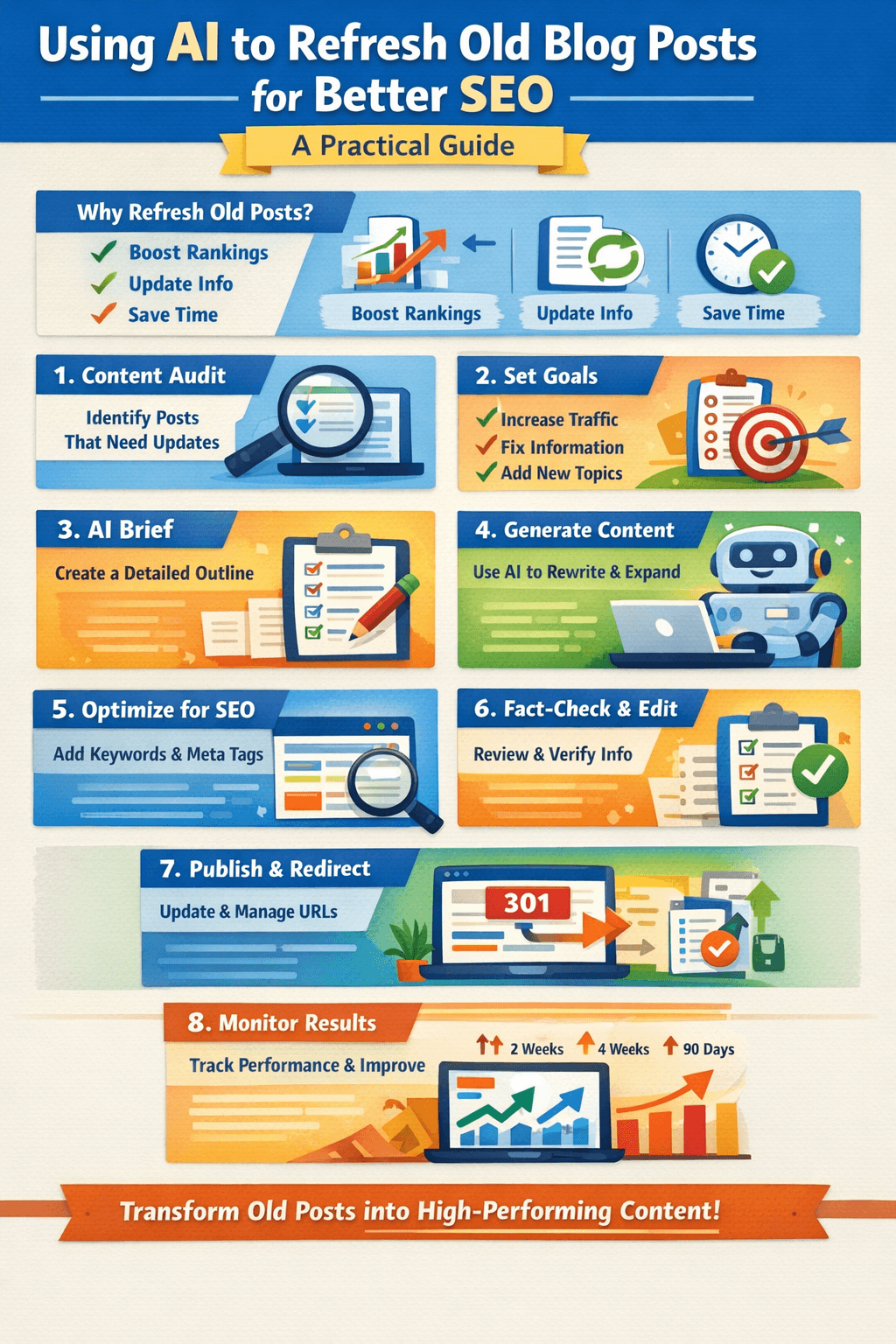
This practical workflow walks you through selecting a post, preparing an AI brief, generating content, optimizing for SEO, and measuring results.
Step 1: Gather data and context
Collect performance data, current keywords, top competitors, backlinks, and internal link structure for the post you plan to update. That context helps AI produce relevant, targeted suggestions.
Step 2: Define the update goal
Decide whether you want to increase traffic, improve conversions, cover a new subtopic, or fix inaccurate information. Having a clear goal keeps the update focused and measurable.
Step 3: Create a brief for AI
A concise brief guides AI to produce better output. Include target audience, desired tone, main keywords, content gaps, and word-count target. The brief reduces revisions and preserves brand voice.
| Brief element | What to include | Example |
|---|---|---|
| Target audience | Who reads this and why | Beginners who want a quick SEO checklist |
| Goal | Single, measurable objective | Increase organic traffic by improving ranking for “on-page SEO checklist” |
| Keywords | Primary and secondary terms | Primary: on-page SEO checklist; Secondary: meta tags, internal links |
| Tone and style | Voice, format, length | Friendly, actionable, 1,200–1,600 words |
| Constraints | What to avoid | No outdated statistics; cite sources |
Step 4: Use AI to generate ideas and outline
Ask AI to suggest updated titles, meta descriptions, and a content outline that matches current intent and search trends. You should supply the brief and any excerpt from the existing post so AI can maintain continuity.
Prompt examples (use these with your AI model):
- “Given the brief below and the current article excerpt, propose 5 updated titles and 3 meta descriptions aimed at improving CTR.”
- “Create an optimized outline that includes new subtopics: [list]. Keep sections scannable and include suggested H2/H3 headings.”
Step 5: Use AI for content rewriting and expansion
Let AI draft updated sections, add new subtopics, and rewrite introductions or conclusions. Use AI to expand list items into full paragraphs, produce examples, or create updated statistics sections.
Prompt templates for rewriting/expanding (use as starting points):
| Task | Prompt template |
|---|---|
| Expand a paragraph | “Rewrite the paragraph below to add actionable steps and a relevant example. Keep the tone friendly and concise. [Insert paragraph]” |
| Add new section | “Write a 300–400 word section about [subtopic], including a short example, a list of 3 practical tips, and one recommended tool.” |
| Update statistics | “Update the following stats with recent sources where possible; present numbers clearly and add citation placeholders.” |
Step 6: Optimize for SEO
After drafting, apply on-page SEO best practices: target keyword in title tag and H1, include LSI keywords in headings and body, write a compelling meta description, add structured data if relevant, optimize images (alt text and compress), and improve internal linking.
A quick on-page checklist:
- Keyword placed naturally in H1 and within first 100 words
- H2/H3 headings that reflect user intent and include related keywords
- Meta description with a clear value proposition, 120–160 characters
- Schema markup for articles, FAQs, recipes, etc., where relevant
- Internal links to and from cornerstone pages
- Compressed images and descriptive alt texts
Step 7: Human edit and fact-check
You must verify facts, links, and claims provided by AI to avoid inaccuracies. Edit for tone, readability, and brand consistency. This human layer prevents hallucinations and ensures the content aligns with your standards.
Step 8: Publish and handle URL considerations
Decide whether to keep the original URL or change it. Keep URLs stable when possible to preserve link equity; if you must change the slug, set a 301 redirect from the old URL to the new one to avoid traffic loss.
Step 9: Monitor results and iterate
Track the baseline metrics you recorded earlier and monitor for changes at 2 weeks, 4 weeks, and 90 days. Some ranking movements occur quickly, while others take months. Use the data to iterate on headlines, snippets, or internal links.
Prompt library: practical examples you can copy
Below are ready-to-use prompts you can adapt to your site and AI model. Use them in your content brief and during editing.
| Purpose | Prompt |
|---|---|
| Generate titles | “Generate 10 SEO-optimized titles for an article about [topic] targeting the keyword ‘[primary keyword]’. Keep them under 60 characters if possible.” |
| Write meta description | “Write a 150-character meta description for an article titled ‘[Title]’. Include the primary keyword and a call-to-action.” |
| Create FAQs | “Generate 6 FAQ questions and concise answers related to [topic], each answer 30–50 words. Use questions people ask on search engines.” |
| Summarize competitor content | “Summarize the key points from these competitor pages: [list]. Identify gaps and suggest 3 unique angles to improve our post.” |
| Rewrite intro | “Rewrite the intro to be more engaging, less than 80 words, and include the primary keyword once naturally.” |
Handling common AI issues
AI can produce useful content quickly, but you must watch for known issues and correct them before publishing.
Hallucinations and factual errors
AI sometimes invents facts or misattributes sources. Verify every statistic, study, and quotation. Replace uncertain claims with verified sources or remove them.
Repetitive phrasing and keyword stuffing
AI outputs can repeat phrases or cram keywords unnaturally. Edit for natural flow and user readability; prioritize helpfulness over exact keyword frequency.
Duplicate content risks
If AI paraphrases existing content too closely, you risk thin or duplicate content problems. Use originality checks and ensure the refresh adds substantive value.
Tone drift and brand voice inconsistency
AI may produce language that doesn’t match your brand. Use clear tone instructions in your brief and perform a final pass to align voice and terminology.
Tools and AI models to consider
You’ll want a mix of SEO and AI tools to streamline this process. The table below lists common categories and representative tools, plus pros and cons.
| Tool type | Examples | Use case | Pros | Cons |
|---|---|---|---|---|
| AI writing assistants | ChatGPT, GPT-4o, Claude, Cohere | Generate drafts, outlines, titles | Fast output, creative suggestions | May hallucinate; needs human edit |
| SEO research | Ahrefs, SEMrush, Moz | Keyword research, competitor analysis | Deep keyword and backlink data | Subscription cost |
| Content optimization | SurferSEO, Clearscope | On-page optimization suggestions | Data-driven content scoring | Can encourage over-optimization |
| Plagiarism checkers | Copyscape, Grammarly | Catch duplicate content | Protects against repetition | Extra cost |
| Analytics | Google Search Console, GA4 | Track rankings and traffic | Free insights into search performance | Requires interpretation |
| Version control | Google Docs, Notion, Git | Track edits and approvals | Collaboration and history | Setup time required |
Time and cost estimates
How long and how much will it cost to refresh posts with AI? Estimates vary by depth of update.
| Update type | Time per post | Typical cost (tool + labor) |
|---|---|---|
| Light refresh (titles, meta, small edits) | 1–2 hours | $10–$50 |
| Moderate update (add sections, update stats) | 3–6 hours | $50–$200 |
| Major rewrite (long-form restructuring) | 8–16+ hours | $200–$1,000+ |
Your costs will depend on whether you use freelancers, in-house editors, or high-tier AI credits and SEO tools.
Example workflow applied: a short case study (hypothetical)
You have a 900-word post from 2019 that once ranked for a mid-volume keyword but now sits on page two. After audit, you prioritize it due to a steady backlink and falling traffic.
- Goal: Move to page one (top 5) within 90 days and increase conversions by 15%.
- Actions taken: Updated title and meta, expanded content with new use cases and 600 words of fresh material, added FAQ schema, improved internal linking, and updated images.
- Tools used: AI for outline and draft, SurferSEO for keyword guidance, GSC to monitor impressions.
- Result (90 days): CTR improved by 18%, average position moved from #14 to #7, conversions increased 12%. Next steps: refine internal linking and A/B test meta description.
This example shows how small, targeted updates can produce meaningful gains.
How to measure success: evaluation windows and expectations
SEO changes aren’t instant. Expect to see early CTR changes and impression shifts within 2–4 weeks, while ranking improvements can take 4–12 weeks or longer depending on competition and crawl frequency.
Reporting cadence
- 2 weeks: Look for immediate indexation and snippet updates.
- 4–6 weeks: Monitor ranking movement and CTR changes.
- 90 days: Evaluate sustained rank improvements, traffic growth, and conversions.
Scaling updates across many posts
If you have hundreds of posts to update, build a repeatable process:
- Automate the audit with tools to pull metrics.
- Group posts by update type (light, moderate, heavy).
- Use AI templates for briefs and outlines to speed up human editing.
- Batch publish changes and stagger updates to avoid overwhelming crawl budget.
Sample batch schedule
| Week | Tasks |
|---|---|
| Week 1 | Audit and prioritize 50 posts |
| Week 2–3 | Create AI briefs and outlines for 10 posts |
| Week 4–6 | Draft and human edit 10 posts |
| Week 7–12 | Publish, monitor, adjust based on data |
Batching keeps quality consistent and allows you to measure learnings across a group.
Legal and ethical considerations
When using AI, you must respect copyrights, avoid misrepresentation, and disclose AI use when appropriate. Always attribute sources for facts and quotes and ensure proprietary data remains secure.
Copyright and sources
If AI suggests an excerpt similar to another site, rewrite and cite the original. For images and charts, ensure you own the rights or use properly licensed assets.
Transparency
If you publish content heavily assisted by AI, decide whether to disclose that to readers. Transparency builds trust, especially in sensitive niches like health or finance.
Common update examples with before/after snippets
Here are brief before-and-after examples so you can see practical differences.
Example – introduction rewrite:
- Before: “This article covers SEO tips for beginners. It will help you get more traffic.”
- After: “You’ll learn seven practical on-page SEO tactics that you can apply this afternoon to boost search visibility and attract more relevant visitors.”
Example – FAQ addition:
- Before: No FAQ.
- After: Add 3 targeted FAQs addressing common user questions and mark up with FAQ schema.
Checklist: pre-publish and post-publish
Use this checklist to ensure your updated post is optimized and tracked.
| Stage | Item | Done |
|---|---|---|
| Pre-publish | Title optimized with keyword | [ ] |
| Pre-publish | Meta description crafted | [ ] |
| Pre-publish | H1 and H2s aligned with intent | [ ] |
| Pre-publish | Facts verified and sources cited | [ ] |
| Pre-publish | Schema and FAQs added if relevant | [ ] |
| Pre-publish | Images optimized and alt text set | [ ] |
| Pre-publish | Internal links checked | [ ] |
| Post-publish | 301s set if URL changed | [ ] |
| Post-publish | Performance baseline recorded | [ ] |
| Post-publish | Monitor at 2, 4, 12 weeks | [ ] |
Final recommendations and best practices
- Start with a clear goal for each update and measure against that goal so you know whether the update was successful.
- Use AI for speed and ideation, but keep humans responsible for accuracy, brand voice, and tone.
- Prioritize posts where the potential ROI is highest: pages with backlinks, existing traffic, or real conversion opportunities.
- Maintain a content calendar for periodic reviews so posts don’t drift obsolete again.
- Keep a log of prompts and versions so you can repeat what works and avoid repeating mistakes.
Wrap-up
You can significantly improve SEO performance by refreshing old posts with the help of AI while maintaining human oversight. Follow a repeatable process: audit, brief, generate, optimize, human-edit, publish, and monitor. Over time, that process will increase organic visibility and reduce effort per page, letting you focus on high-value content strategy.
If you’d like, provide one URL or an excerpt from a post you want to refresh and I can suggest an AI brief, updated title options, meta descriptions, and a content outline tailored to your goals.
